POS Backoffice
Merchant API clients
Authorized merchant administrators can manage machine-to-machine POS access from Backoffice → API clients.
- Create the confidential credential in the deployment's identity provider.
- Register only its exact public client ID in POS; never paste a client secret into POS.
- Bind every client to one organization and at least one explicit store. Organization-wide wildcard access is intentionally unsupported.
- Use
OPERATEfor normal catalog, sale, and shift operations. GrantMANAGEonly when the integration requires supported elevated operations. - Revoking the POS binding takes effect independently of the identity provider. Complete a revocation by also disabling or rotating the credential at the identity provider.
The page is available only to SYSTEM_ADMIN, ORG_ADMIN, UNIT_ADMIN, and
MERCHANT_ADMIN. POS stores authorization metadata, timestamps, and actor identity—not
the secret or private key.
The POS backoffice is the merchant operations workspace for head office, inventory teams, branch supervisors, reporting users, and loyalty users.
It is deliberately separate from the main organization portal:
- the main organization portal remains the source of truth for
Emalibalances and platform-settled money - POS backoffice owns merchant operations, inventory, loyalty, reports, terminals, and branch execution
The browser uses two explicit API origins. VITE_API_BASE_URL points to the
standalone POS API for /api/v1/pos/** and /api/v1/org-inventory/**;
VITE_PLATFORM_API_BASE_URL handles organization, card-present, merchant
onboarding, and other platform-owned routes. Neither origin proxies through the
POS service.
All operational currency and locale behavior comes from the selected store's operating profile. The backoffice does not supply a country fallback. Inventory price writes and CSV imports require an ISO 4217 currency, and provider-specific KRA/eTIMS mapping fields are shown only when the target store has a KRA/eTIMS fiscalization binding.
Verified UI
The screenshots below were captured from the live local POS backoffice on 2026-03-30 using the Pick n Pay merchant demo estate.
Executive Overview
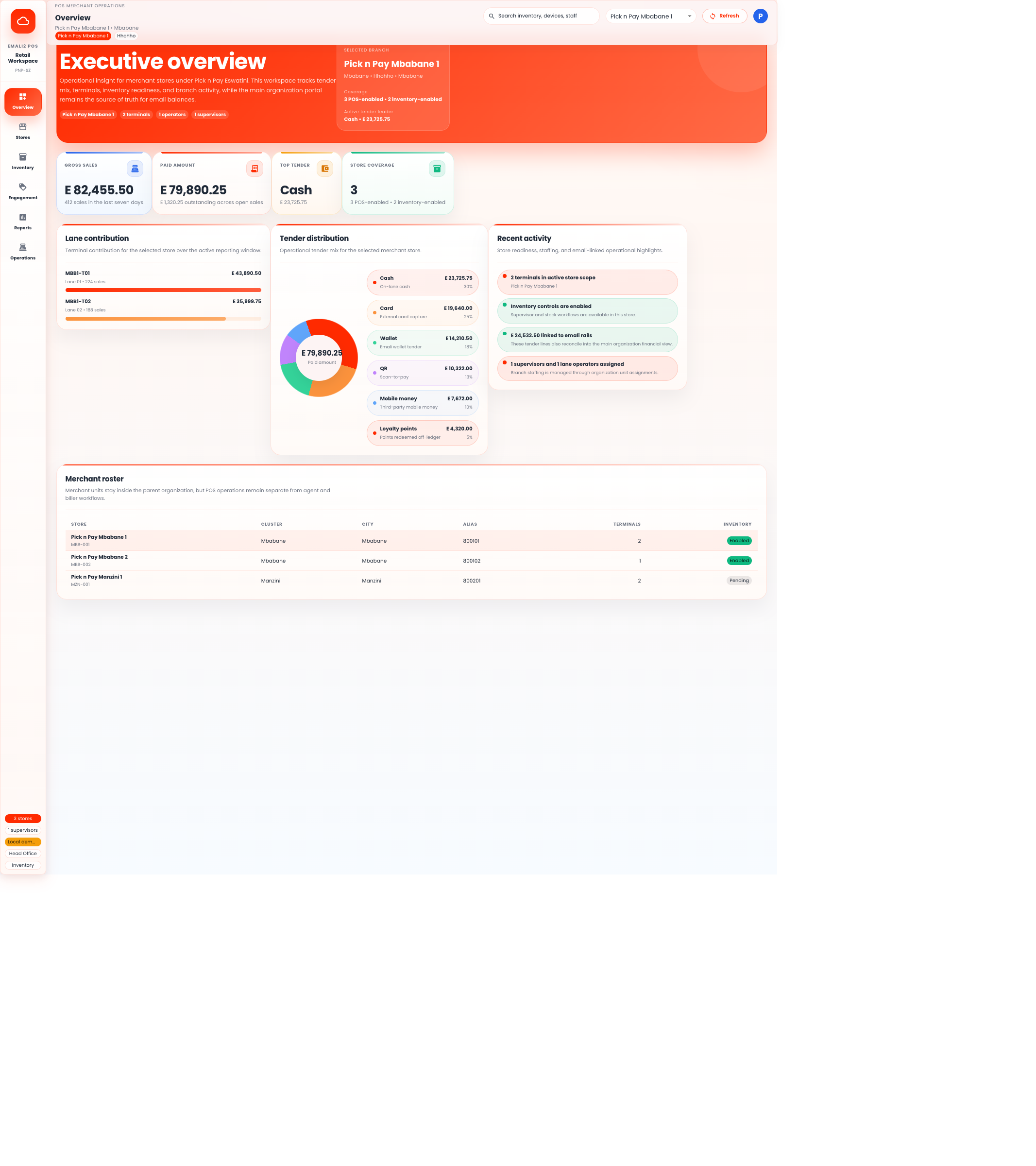
This view is the merchant head-office landing page. It shows:
- gross sales and paid amount
- tender distribution across cash, card, wallet, QR, mobile money, and loyalty
- lane contribution by terminal
- merchant roster coverage across stores
Inventory Workspace
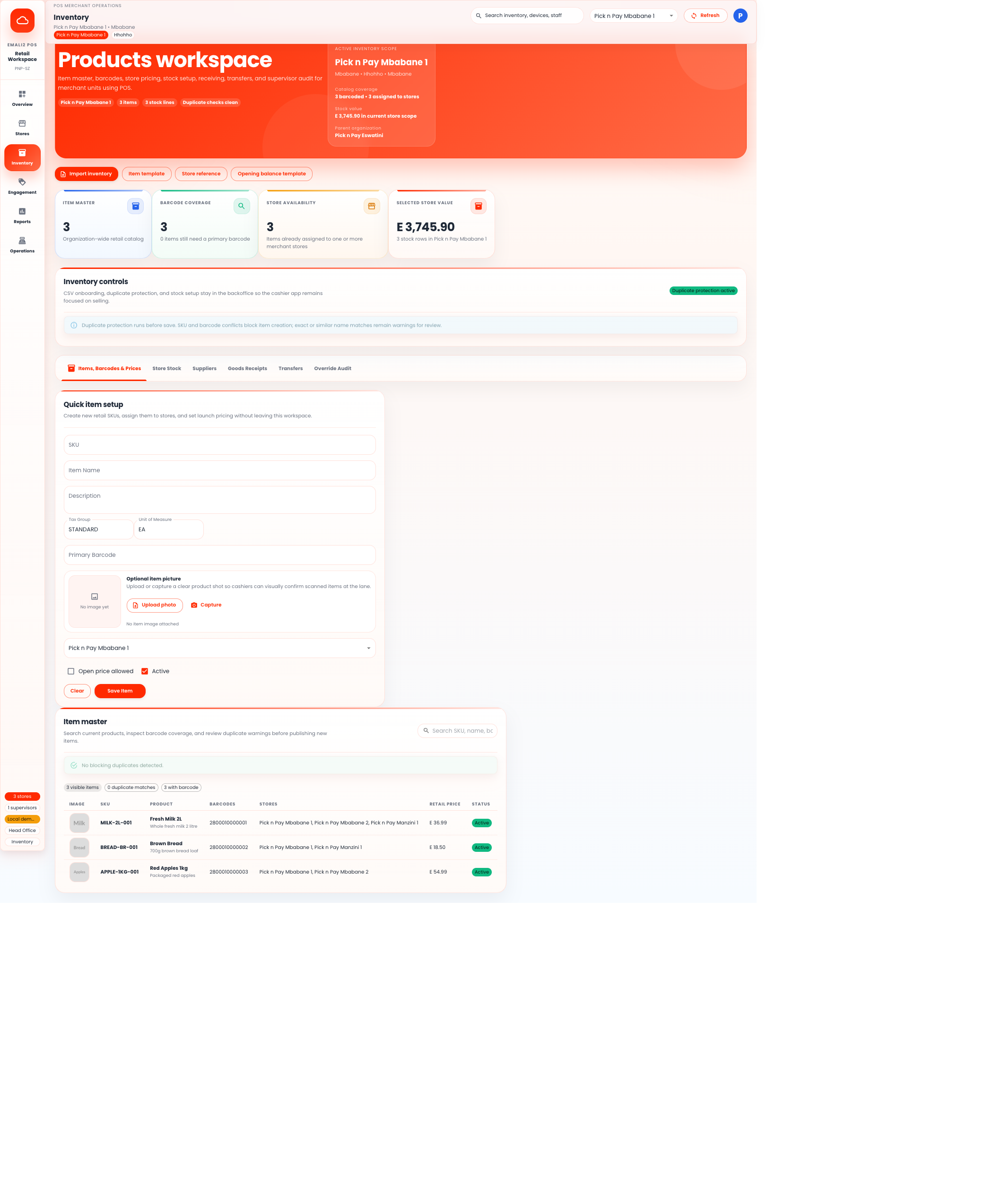
This view is the main inventory control surface. It covers:
- item master and barcode management
- duplicate protection before save
- store-level assignment and pricing
- optional item image upload or capture
- CSV import templates for onboarding and opening stock
Core Modules
Overview- executive dashboard for the selected merchant store
Stores- store profile, capability flags, country/provider configuration, secure terminal enrollment, and latest terminal hardware health
Inventory- items, barcodes, stock setup, receipts, transfers, and overrides
Engagement- loyalty, rewards, customer profiles, and promotions
Reports- branch and tender performance, settlement and exception reporting
Operations- terminal reachability, staffing, shift controls, fiscalization and electronic-refund exception review, provider-statement reconciliation, sanitized offline conflict resolution, TMS, acquiring operations, and chargebacks
Backoffice can issue the short-lived, one-time enrollment challenge but cannot activate a terminal on its behalf. The terminal must prove possession of its submitted EC or RSA private key by signing the versioned activation payload; the service verifies that proof before it looks up or consumes the challenge.
Primary Users
ORG_ADMIN- merchant head-office oversight
POS_INVENTORY_USER- item, stock, and receiving workflows
UNIT_ADMIN- branch supervisor and terminal operations
POS_MARKETING_USER- promotions, rewards, and loyalty execution
VIEWER- read-only operational reporting
Design Rules
- cashier selling stays out of backoffice
- operational tender reporting stays in POS, not in the main organization finance views
- store stock remains merchant-unit scoped
- duplicate protection blocks SKU and barcode conflicts before item creation
- item images remain optional and do not block inventory onboarding
Terminal lifecycle
An ORG_ADMIN, UNIT_ADMIN or SYSTEM_ADMIN can create a short-lived,
one-time terminal activation code from the store card. Backoffice receives the
code as a direct response, displays it as a device handoff ticket, and clears it
when the dialog closes. It does not log the code or save it in browser storage.
The store operating profile must be configured first. This ensures a newly
activated client receives explicit country, currency, locale, time zone,
fiscalization and provider routing rather than an application default. A
SERVICE_PROVIDER may manage supported store configuration but cannot mint a
terminal activation code; the backend and UI both preserve the merchant-admin
gate.
The same merchant-management roles can revoke an active terminal from its store card. Revocation requires an audit reason and is rejected while the terminal has an open cashier shift. The terminal row is locked while the service checks for an open shift, preventing a new shift from racing with revocation. Close and reconcile the shift first, then revoke the device. The revocation dialog performs this preflight and, when a shift is open, shows its cashier, expected cash and opening time. An administrator must enter the physical drawer count and a closure note before Backoffice closes and submits the shift with a replay-safe idempotency key. Final submission atomically creates the signed server close-of-day pack; Backoffice immediately reads it back and shows the first characters of its SHA-256 evidence digest. The pack remains retrievable by session UUID and includes drawer, tender, refund, fiscal-state and exception rollups covered by a Secret-backed Ed25519 signature. Revocation does not erase local Android data or terminate the cashier's identity-provider session; those remain separate device-recovery actions.
Offline conflict work queue
Operations lists rejected offline mutations for the selected store without
exposing the raw device payload or idempotency key. Each row identifies the
terminal, country-neutral operation, safe outcome code, occurrence count and
last-seen time. A store manager must add an audit note before requesting
RETRY or DISCARD.
RETRY permits the enrolled terminal to replay the local job with its original
per-item idempotency key. DISCARD blocks that exact terminal mutation key from
executing in a later batch. A successful idempotent replay marks the conflict
resolved automatically. Electronic payment initiation is not eligible for the
offline batch path.
Support diagnostics
Operations presents one prioritized, store-scoped support queue above the detailed operational workspaces. It derives signals from existing POS data and does not create a second source of truth:
- terminal heartbeat missing, older than 30 minutes, or critical after two hours;
- battery at 20% or below, critical at 10% or below;
- an explicit
OFFLINE,DISCONNECTED, orNONEnetwork report; - printer or scanner readiness reported as false;
- open offline conflicts, promoted to critical when repeated three times or older than one hour;
- customer-payment, electronic-refund, and fiscalization manual-review queues;
- card-present service unavailability.
Critical signals sort before warnings. Each row links to the relevant existing terminal or exception workspace; it does not retry, resolve, or submit an external operation. Presentation excludes customer routing data, raw offline mutations, terminal UUIDs, credentials, and provider payloads. These thresholds are an in-product operator aid. External paging and notification delivery remain a separate observability integration.
Customer payment exception review
Operations gives ORG_ADMIN, UNIT_ADMIN, MERCHANT_ADMIN and
SYSTEM_ADMIN users a store-filtered queue for customer-app payment attempts
in MANUAL_REVIEW. This is a provider-neutral workflow: the configured
provider code and capability are shown, but no country, payment brand,
customer routing value or raw provider payload controls the behavior.
The manager first verifies the amount, currency and provider reference outside Emali2 using a provider portal, provider support case, provider statement or settlement report. The manager then selects exactly one outcome, supplies an opaque evidence reference and the provider's outcome time, and may add an opaque provider transaction reference. Phone-number-shaped references and customer data are rejected.
Confirmed capture applies the existing local provider-result transition and may complete the tender, sale, stock and receipt. Confirmed failure releases the pending tender only when the same sale invariants permit it. The workflow never sends a new prompt, status query, cancellation or refund. Both outcomes are idempotent, audited, merchant/store scoped and protected against a concurrent terminal payment result.
Electronic refund exception review
Operations gives ORG_ADMIN, UNIT_ADMIN, MERCHANT_ADMIN and
SYSTEM_ADMIN users a store-filtered queue for electronic refund jobs in
MANUAL_REVIEW. Each row shows only the generic capability, configured
provider code, amount and sanitized outcome. It does not expose payment
credentials, customer routing data, raw provider payloads or stored evidence
references.
The manager selects exactly one independent evidence source: provider portal, provider support or settlement report. The evidence and provider-refund values must be opaque references; customer names, phone numbers and payment accounts are prohibited. A confirmation dialog makes the operational boundary explicit: the action records a verified success or rejection and never sends another provider request. Confirmed success can resume the next sequential leg; confirmed rejection cancels later unsubmitted legs. Both outcomes remain idempotent, audited and merchant scoped.
Fiscalization exception review
Operations gives the same merchant-management roles a store-filtered queue for
fiscalization jobs in MANUAL_REVIEW. A warning above the queue states the
critical boundary: this workflow records an outcome already verified outside
Emali2 and never resends, retries or cancels a fiscal document.
No outcome is preselected. The manager must explicitly choose accepted or rejected and identify one independent evidence source: provider portal, provider support, fiscal-device record or certified report. Both the evidence reference and an accepted document's provider reference must be constrained, opaque values; customer data and phone-number-shaped values are rejected. Rejection omits the provider reference. A confirmation dialog repeats the no-submission boundary before the request is sent. The resulting receipt or credit note update is idempotent, audited, merchant/store scoped and reflected in the fiscalization event stream.
Provider settlement reconciliation
Operations includes a country-neutral statement importer for ORG_ADMIN,
UNIT_ADMIN, MERCHANT_ADMIN and SYSTEM_ADMIN. The provider selector is
derived only from the selected store's enabled CUSTOMER_APP_PAYMENT,
MOBILE_MONEY and CARD_PRESENT bindings. A country name, payment brand or
tax authority is never used as a core switch.
The downloadable CSV template has exactly eight columns: line number, generic entry type, generic reference type, transient provider reference, gross, fee, net and occurrence time. Extra columns are rejected so customer names, phone numbers or accounts cannot silently enter the workflow. Files are bounded to 2 MB and 1,000 lines. Raw entry references remain only in browser memory while the request is prepared, are never written to browser storage, and are cleared after a successful import.
The match rail displays each safe result as matched or exception, while the detail table exposes only the final reference suffix and fixed operator guidance. Immutable history shows provider, generic capability, date, totals and counts. This UI does not run card clearing, payout, settlement execution or provider refunds; those remain provider/adapter responsibilities.